← Back to selected work

Workflow automations

n8n pipelines that take repetitive, error-prone work off people's hands, with the checks built in: what triggers each one, where the model reasons, and what happens when something doesn't fit.

Invoice Processing Workflow

Designed to replace hours of manual labor. The AI extracts vendor, number, date, total and currency from emailed documents (various formats), cleans them, files them in Google Drive, flags duplicates instantly rather than weeks later and emails a daily summary.

31
nodes in one workflow
2
duplicate checks before filing
7
real-world edge cases handled
  • n8n
  • Gemini
  • Gmail
  • Google Drive
  • Google Sheets
  • JavaScript
Workflow sheetInbox → Ledger → Summary
Gmail trigger Label as processed Split into PDFs Loop over each PDF Extract & clean text Has a text layer? Gemini extraction Validation gate Already in ledger? Already in Drive? File to Drive Ledger row
If the PDF is a scan
Gemini reads the image Rejoin at validation
If a gate fails or it's a duplicate
Errors log Reply to sender
When every PDF is done
Today's invoices & errors Daily summary email
TriggerAI modelGuardrailOutputMain pathFallback path
Cases from the real sample set
  • Not every PDF is an invoiceA delivery note marked "this is not an invoice" is classified and rejected, not forced through.
  • One PDF, two invoicesThe model returns an array; each invoice becomes its own item before filing.
  • The second-notice duplicateA reminder copy is caught twice, against the ledger by invoice number, then against Drive by file name.
  • European number formats2.280,04 € is explicitly normalized to 2280.04, never left to chance.
  • Scans with no text layerEmpty extraction falls back to a vision-capable model reading the page image.
  • Total due vs. discountThe prompt targets the final amount due, not the early-settlement figure beside it.
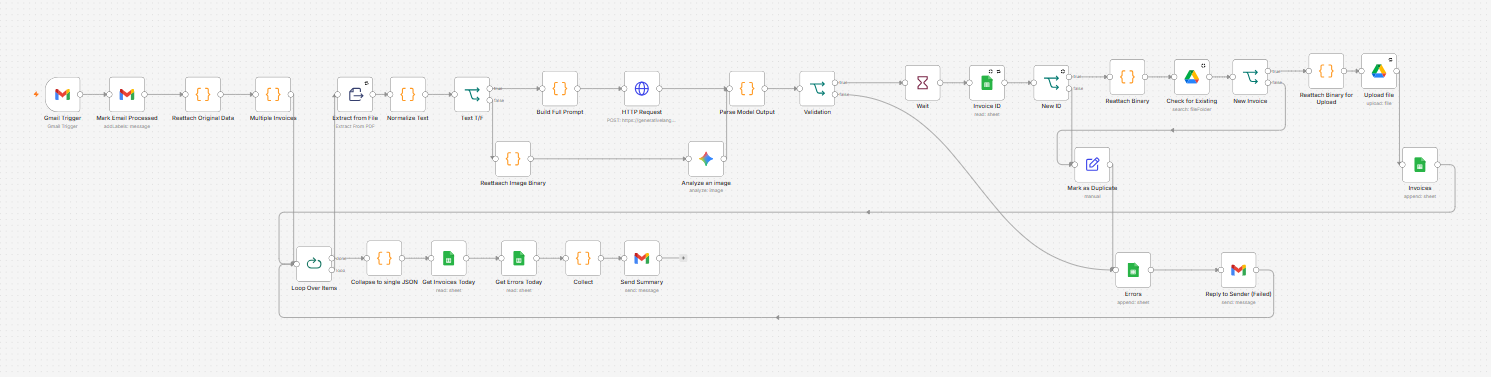
Invoice Processing Workflow in n8n
Invoice Processing Workflow in n8n · Open full size ↗

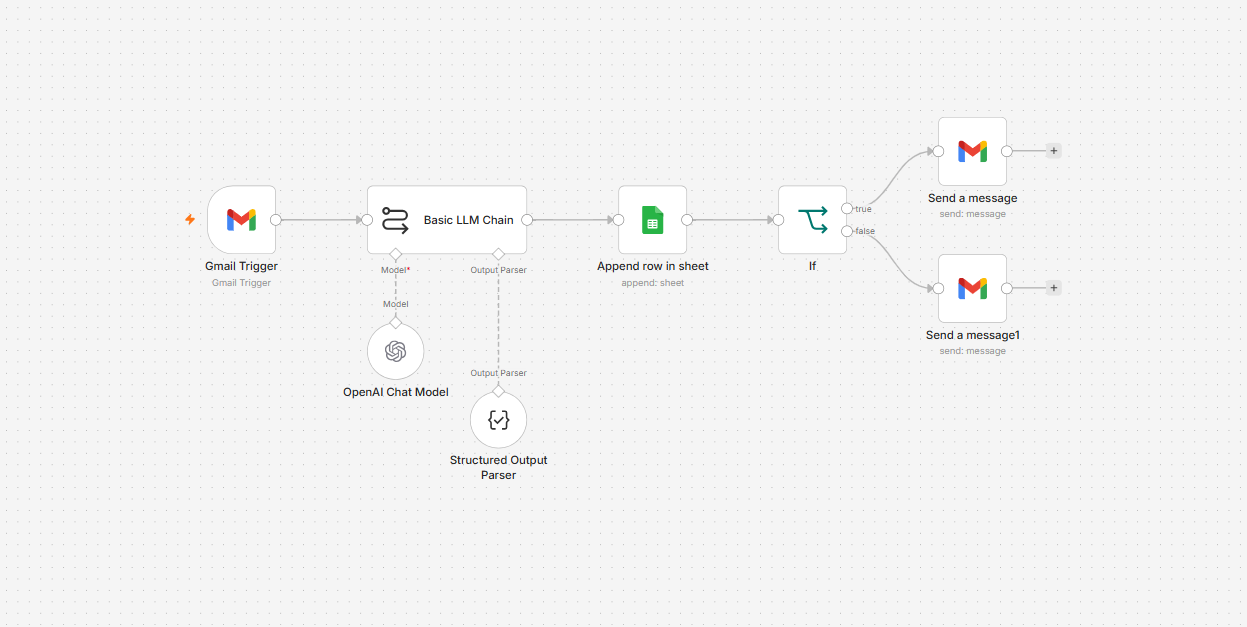
AI Customer Support Qualifier

Built for a makeup and beauty brand's support inbox. Every new email is read by a language model, classified as a refund request or a product inquiry, summarised, logged to a Google Sheet and answered with the right acknowledgement, addressed to the customer by name.

8
nodes end to end
2
strict categories
1 min
inbox polling interval
  • n8n
  • OpenAI GPT-5 mini
  • Gmail
  • Google Sheets
Workflow sheetInbox → Log → Reply
Gmail trigger LLM classifier Structured output Log to support sheet Is it an inquiry? Reply: inquiry received
If it's a refund request
Reply: refund request received
TriggerAI modelGuardrailOutputMain pathFallback path
How it stays reliable
  • Exactly two categoriesThe prompt defines what counts as a refund or an inquiry, and the model may answer with nothing else.
  • Structured output, not free textA parser enforces name, category and summary before anything is written.
  • Every email is on recordName, category, summary and sender are logged to the support sheet before any reply goes out.
  • The right reply, by nameRefunds and inquiries each get their own acknowledgement, addressed to the customer.
AI Customer Support Qualifier in n8n
AI Customer Support Qualifier in n8n · Open full size ↗

AI Sourcing Agent

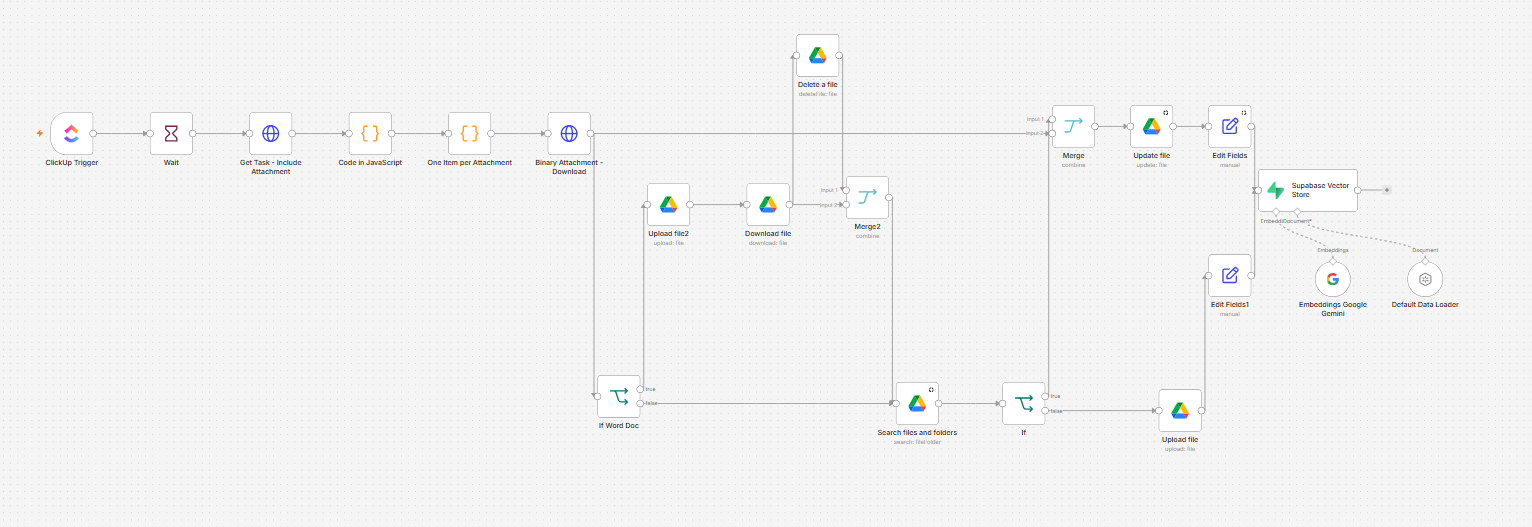
The ingestion side of a recruitment sourcing agent. When a candidate is added in ClickUp, the workflow pulls their CV, files it in a clean candidate database on Google Drive and embeds it into a Supabase vector store, so the whole talent pool is ready for semantic search.

21
nodes end to end
3
CV formats accepted
1
file per candidate, matched by email
  • n8n
  • ClickUp
  • Google Drive
  • Supabase
  • Gemini embeddings
  • JavaScript
Workflow sheetClickUp → Drive → Vector store
ClickUp: task created Read candidate fields One item per CV Download CV Word document? Find candidate by email Update their file Gemini embeddings Supabase vector store
If it's a Word document
Convert in Google Docs Export plain text Delete temp copy
If the candidate is new
Upload as "Name – Email"
TriggerAI modelGuardrailOutputMain pathFallback path
How it keeps the database clean
  • One file per candidateBefore filing, it searches the database by email. A returning candidate's CV is updated, never duplicated.
  • Only real CVsAttachments are filtered to PDF, DOC and DOCX; anything else on the task is ignored.
  • Word files converted firstDOCX files go through Google Docs to plain text, and the temporary copy is deleted afterwards.
  • Consistent namingEvery CV is saved as "Name – Email", with details read from the task's custom fields.
AI Sourcing Agent ingestion workflow in n8n
AI Sourcing Agent ingestion workflow in n8n · Open full size ↗